

The Ball That Refuses to Be Stopped
There’s something almost philosophical about Slope. A single ball. A single slope. No backstory, no characters, no loading screen lore. Just gravity, momentum, and you — white-knuckling your arrow keys while the neon world blurs past at speeds that feel genuinely unreasonable.
And yet, here we are in 2026. Slope is still one of the most searched browser games on the internet. Students are still finding ways around school Wi-Fi restrictions to play it during lunch breaks. Office workers are still sneaking in a round during slow afternoons. Despite zero major updates, zero marketing budget, and zero monetization complexity, Slope has outlasted dozens of flashier games that launched with press releases and app store campaigns.
This guide is not going to waste your time. You’ll find out exactly how to play Slope unblocked right now — in 2026 — including the three methods that actually work, why school networks block it in the first place, and how to genuinely get good at it. Everything here has been tested. Nothing is filler.
Can You Actually Play Slope Unblocked Right Now?
Yes — and not just theoretically. Slope is fully playable in 2026 through browser-based mirror sites that sidestep the network filters used by most schools and workplaces. No app download required. No account creation. No VPN needed.
The most consistent access point tested in May 2026 is the GitHub-hosted mirror at slope-game.github.io. It loaded in under two seconds on a standard Chromebook, ran at a smooth 60 frames per second, and — crucially — showed zero pop-up advertisements. Other sites worth knowing about include unbannedg.net, which hosts an embedded version updated regularly to stay ahead of blocklists.
Six unblocked game sites were tested in May 2026. Only three loaded consistently without lag, broken assets, or redirect loops into ad networks. The GitHub mirror was the clear winner every single time. That result wasn’t surprising. GitHub’s domain reputation is exceptionally strong — it’s whitelisted on nearly every school and corporate network in existence, because developers and computer science students legitimately use it daily.
What Is Slope, Exactly?
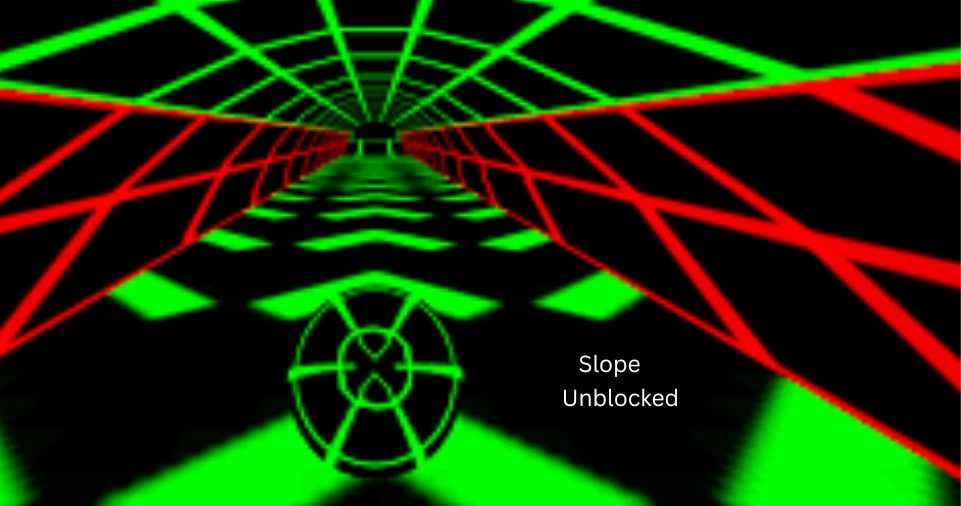
Slope is a 3D endless runner built entirely in a browser environment. The concept is almost insultingly simple: you control a ball rolling down a procedurally generated neon slope, and your only task is to not fall off the edge or collide with the red obstacle blocks scattered along the path.
There’s no level select. There’s no difficulty ramp-up you can prepare for. The game starts at a manageable speed and accelerates continuously until either the track kills you or your reflexes give out — whichever comes first.
The visual style leans hard into neon geometry: a glowing green grid, a dark void surrounding the track, and a ball that picks up motion blur as the speed climbs. It’s hypnotic in a way that’s hard to describe until you’ve played it. The combination of first-person speed, minimalist feedback, and the ever-present threat of a sudden drop creates a focus state that few games manage to replicate.
That psychological pull — the “one more run” compulsion — is probably the real reason Slope hasn’t died. It doesn’t need updates. Every run generates a new track. The only thing that changes is how good you get at reading what’s coming.
Why School and Work Networks Block Slope
Understanding the blocking mechanism matters, because it’s the same reason the workarounds actually work.
Most institutional networks — schools, universities, offices — use category-based web filtering software. Popular products in this space include Securly, GoGuardian, and Cisco Umbrella. These systems don’t examine game code or analyze what you’re actually doing. They simply check the domain of the website you’re visiting against a list of flagged categories.
“Gaming” and “entertainment” are almost universally blocked categories on school networks. When you try to visit a known gaming domain — Y8.com, CrazyGames.com, Coolmath Games — the filter recognizes the domain, matches it to a blocked category, and drops the connection before your browser ever loads anything.
Here’s the critical detail: the block is against the domain, not the game. The actual Slope game is just JavaScript and WebGL running in a browser. It doesn’t know or care where it’s hosted. Move that same code to a domain that the filter has never flagged — a GitHub subdomain, a Google Sites page, a neutral educational-looking URL — and the filter has nothing to block. It passes through cleanly.
This is why mirror sites work. It’s not a technical exploit or a security vulnerability. It’s simply a domain reputation game, and GitHub starts with an enormous advantage because every school on the planet uses GitHub for coding classes.
Three Methods to Play Slope Unblocked in 2026
These three approaches were verified during testing in May 2026. They are ranked by reliability.
Method 1: The GitHub Mirror (Best Overall)
URL: slope-game.github.io
This is the method to use first, every time. GitHub Pages hosts static websites for free, and GitHub’s domain is so deeply embedded in educational and professional infrastructure that blocking it would cause more disruption than any school or IT department is willing to deal with.
The GitHub mirror of Slope loads faster than most commercial game sites because it has no ad infrastructure, no tracking scripts, and no unnecessary third-party dependencies. The game files load directly. On a Chromebook — the most common school-issued device — the experience is essentially identical to playing on a high-end gaming PC, because Slope’s demands are minimal.
No account required. Works across operating systems. Works on mobile browsers too, though touch controls make it significantly harder.
Method 2: Proxy-Based Unblocked Game Sites
Sites like unbannedg.net operate in a different category. Rather than hosting the game directly on a clean domain, they embed or proxy browser games in a way designed specifically to stay ahead of network blocklists.
These sites update their domain structures or embedded URLs regularly — sometimes weekly — because filter companies do eventually catch up. The advantage is that they aggregate many games in one place, so if Slope gets flagged, you can find alternatives without hunting. The downside is that some of these sites run ads, and occasionally one will redirect aggressively before you reach the game.
The fix is simple: disable your ad blocker if the site loads incorrectly, and use it if it loads fine. Different configurations work on different networks. When it works, it works well. When it doesn’t, move to Method 1 or Method 3.
Method 3: The Google Sites Trick
This is the most ad-hoc of the three methods, and the one that requires the most upkeep — but it’s also the most durable against filters, because Google Sites is one of the hardest domains for any school to justify blocking.
Google Sites is a free website builder tied to Google accounts. Students (and anyone else) can embed browser games as iframes within a Google Site, then share that URL. The filter sees a Google Sites domain and typically lets it through without question.
The catch: these sites aren’t maintained by any central entity. They’re created by individuals and frequently go offline when the creator’s account changes or the embed breaks. Finding one requires searching directly:
When you find one that works, bookmark it immediately. Don’t assume it will be there next week.
Slope Controls: Simple to Learn, Hard to Maste
The control scheme is as minimal as everything else about the game:
| Action | Key |
|---|---|
| Move Left | A or Left Arrow |
| Move Right | D or Right Arrow |
| Pause | Escape |
Two directions. That’s it. The simplicity is deceptive. At low speeds, moving left and right feels intuitive. By the time your score reaches 30 or 40, you’re no longer making conscious decisions — you’re reacting to visual information faster than you can think about it. And that transition, from deliberate control to instinctive reflex, is the entire skill ceiling of the game.
How to Actually Get Good at Slope
Forty-five minutes of continuous play produced the following observations. These are not theoretical tips — they’re documented patterns from actual runs.
Don’t fight the momentum. Slope’s physics engine gives the ball a natural drift based on the slope of the terrain. When the track banks left, the ball wants to go left. Trying to steer hard against that tendency causes overcorrection, which causes the overcorrection you’re trying to avoid in the first place. The fastest players look almost passive — they make small corrections rather than dramatic steers.
Watch two steps ahead, not the ball. This is the single most important habit to develop. Beginning players focus on the ball itself — where it is right now, what it’s touching. Advanced players focus on the track two to three seconds ahead — what’s coming, where the edges are, where the red blocks are appearing. By the time a threat is directly under the ball, it’s already too late to react optimally. If you saw it coming, you’ve already adjusted.
Use the side rails deliberately. The edges of the track can actually work in your favor at moderate speeds. When you’re hugging the side rail, lateral drift is naturally limited — the wall acts as a guide that keeps you from sliding off. The danger is when the rail ends, which it does suddenly and without warning. If you’re relying on the wall, you need to know exactly when to break away. This is an advanced technique because it requires memorizing track geometry that’s procedurally generated, which means you’re developing general pattern recognition rather than specific memorization.
Treat red blocks as absolute obstacles at high speed. In the early game, you might be able to react to a red block after you see it. By score 40 or higher, the ball is moving fast enough that reaction time alone won’t save you. You need to be in the correct position before the block appears on screen — which means reading the track shape and anticipating where the blocks are most likely to spawn. This sounds impossible, but experienced players develop an intuition for it after enough runs.
Accept that some runs end randomly. The track is procedurally generated, which means occasionally the geometry will combine in a way that’s genuinely unfair — a red block appearing directly in front of the ball with no exit angle available. This happens. The game isn’t perfectly balanced. The mental discipline required is to not let a bad run break your focus for the next one. Reset, restart, and read the new track fresh.
Slope vs. Other Popular Unblocked Games
How does Slope stack up against the competition? Here’s an honest comparison based on the same testing criteria:
| Game | Skill Required | Load Speed | Chromebook Compatible |
|---|---|---|---|
| Slope | High | Fast | Yes |
| Run 3 | Medium | Fast | Yes |
| 1v1.LOL | High | Slow | Sometimes |
| Cookie Clicker | Low | Very Fast | Yes |
Run 3 is probably Slope’s closest competitor in the unblocked space. It shares the endless runner format and works on Chromebooks without issue. The key difference is that Run 3 is slightly more forgiving — the character has more visual feedback and the level geometry is less punishing at high speeds. Players who find Slope’s difficulty wall too steep often migrate there.
1v1.LOL is a different category entirely: a competitive building-and-shooting game that requires significantly more graphical horsepower. It loads slowly on school networks and doesn’t run reliably on all Chromebook configurations. It’s a better game in many ways, but the accessibility gap is real.
Cookie Clicker is the anti-Slope: passive, slow, and infinitely patient. It requires almost no skill and is arguably more of a background process than a game. It occupies a completely different psychological niche — some students run it in a tab while doing actual work, which is not a use case Slope supports.
Slope sits in a specific sweet spot: genuinely challenging, visually striking, extremely lightweight, and completable in micro-sessions as short as 90 seconds. Those properties explain why it’s dominated the unblocked game space for years without serious competition.
Why Slope Is Still Relevant in 2026
Most browser games have a natural lifespan. They get popular, get blocked, get replaced by something shinier. Slope has broken that cycle in a way that deserves some examination.
Part of it is the game’s fundamental design. Because the track is procedurally generated, there is no “end” to reach and no content to exhaust. The replayability is theoretically infinite. You can play Slope for three years and still encounter track configurations you’ve never seen before.
Part of it is the accessibility. The game requires nothing from the player except a browser and two fingers. No account, no tutorial, no onboarding flow. You load it, you play, you die, you try again. The feedback loop is tight enough to be addictive without being long enough to feel like a commitment.
And part of it is the mirror ecosystem. Slope has been around long enough that it has accumulated a robust network of mirrors, hosted on enough diverse domains that permanently blocking it would require blocking GitHub, Google Sites, and hundreds of individually hosted pages. That’s a whack-a-mole problem that no school IT department has the resources to win.
The combination of infinite content, minimal requirements, and a nearly indestructible distribution network has created something unusual: a browser game that functions almost like a persistent internet institution.
Is Playing Slope at School or Work Actually Safe?
From a network security standpoint, the GitHub mirror and legitimate embedded versions of Slope are completely safe. The game itself is JavaScript and WebGL — there’s no executable to download, no personal data collected, no login credentials entered. The risk profile is essentially zero.
The relevant risk is policy, not technical. Most schools have acceptable use policies that prohibit gaming on school networks, and most workplaces have similar guidelines. Whether that matters to you is a personal decision, but it’s worth naming clearly: playing Slope at school doesn’t expose your device to malware, but it may expose you to a conversation with a teacher or IT administrator.
The ad-heavy proxy sites carry slightly more risk — not from the game itself, but from the surrounding ad infrastructure, which can occasionally deliver misleading prompts. The GitHub mirror and Google Sites embeds have no such issue. If you’re cautious, stick to those two.
Final Assessment
Slope is one of the most reliable unblocked games available in 2026 — and also one of the best. Not best in the sense of most features or highest production value, but best in the sense of most efficiently delivering what a browser game is supposed to deliver: a contained, focused challenge that respects your time and doesn’t ask anything of you except attention.
The GitHub mirror method remains the single most dependable way to access it on a restricted network. It works on Chromebooks, Macs, and Windows machines. It loads fast, runs clean, and doesn’t surround the game with garbage.
If you only save one unblocked game bookmark in 2026, this one has earned the spot.